Installing a Colour Correction Module into
PlayStation Model SCPH 1002.
IMPORTANT: READ THESE INSTRUCTIONS THOROUGHLY BEFORE ATTEMPTING THIS MODIFICATION! If you have any questions or queries about the installation described in this document call Andrew on 04-4773386 or email me at psx@fatcat.co.nz Please read Disclaimer if you have not done so. |
IDENTIFYING YOUR MODEL OF PLAYSTATION
Before dismantling your PlayStation turn it over and look at the label on the bottom of the case. On the top right corner of the label it will indicate what model you have. These instructions are for the model SCPH 1002. If this model number is different do not use this set of instructions.
MINIMUM EQUIPMENT REQUIRED
Medium size Phillips Screwdriver.
Solder Iron with a fine tip.
Side Cutters.
Time – Don't rush!!
REMOVAL OF TOP COVER.
The Laser Drive is the black plastic unit siting on several supports located to the back left on the metal plate.
REMOVAL OF CONTROLLER/MEMORY CARD HOUSING.
Located at front of the PlayStation.
DISCONNECTION OF POWER SUPPLY CABLE.
The Power Supply is located to the left-hand side of the main board in PlayStation.
REMOVAL OF THE METAL PLATE.
What the Laser Drive was mounted on.
REMOVAL OF THE MAIN BOARD.
INSTALLING THE COLOUR CORRECTION MODULE
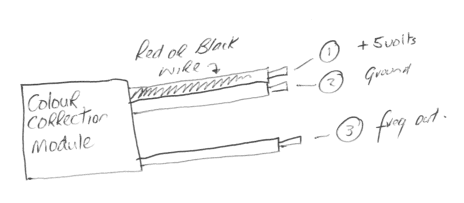
This requires 3 wires from the Colour Correction, a wire link to be soldered in place and 2 pins on the video chip to be lifted. Familiarize yourself with the Colour Correction Module supplied and the diagram and a table below.
Diagram of Colour Correction Module
| Wire number | Purpose | Connection on main board as indicated on diagram |
| Wire 1 | +5 Volts | Circle with a 1 - Top side of board |
| Wire 2 | Ground | Circle with a 2 - Top side of the board |
| Wire 3 | Freq Out | Circle with a 3 - Top side of the board |
Connecting Wire 1 from Colour Correction Module to the board
Connecting Wire 2 from Colour Correction Module to the board
Diagram for Wire 1 and Wire 2
(Top side, middle of board)

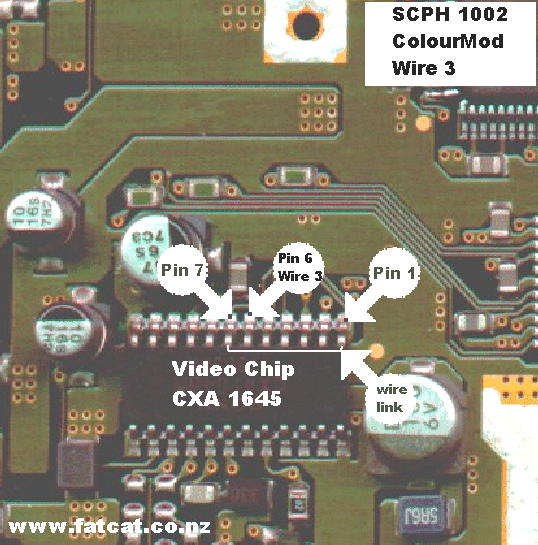
Connecting Wire 3 from Colour Correction Module to Video Chip
Look at the diagram below to identify pins 6 and 7 on the video chip (marked CXA 1645). These 2 pins have to be carefully lifted from the board. The easy way to lift the pins is by using your soldering iron to heat the pin/track and using a small jewellers screwdriver to lever the pin up. CAUTION: Don't use to excessive force or you may break the pin off the video chip.
Diagram for Wire 3 and Video Chip
(Top side, middle of board)
DOUBLE CHECK that you have soldered the wires to correct positions on the main board and that the soldered connections are good, no bridging or blobs of solder left on the board etc
Now you are ready to re-assemble your PlayStation by simply by following the steps in reverse order from step: REMOVAL OF THE MAIN BOARD. When you get up to the stage where you have to refit the metal plate holding the Laser, position the Colour Correction Module to either exit from the front between the metal plate and controller house, then using the double sided tape stick over the screw hole (after putting the screw in)on the middle of the metal plate or have it exit out on the right hand side of the metal plate and using the double sided tape stick it down over the air vents on the metal plate.
Once you have re-assembled your Playstation, plug in all your leads and turn it on and check that it will load an Original CD and an Imported or Back up CD. Check that the NTSC original/import game is playing in colour.
If all has gone well congratulate yourself otherwise read the Troubleshooting section.
TROUBLESHOOTING
If you identify any of the following:
If can't find any obvious reason for the problems you are experiencing either call Andrew on 04-4773386 or email me.